





🎯 iDryfire® Pro Dry Fire Target System
🎯 iDryfire® Pro
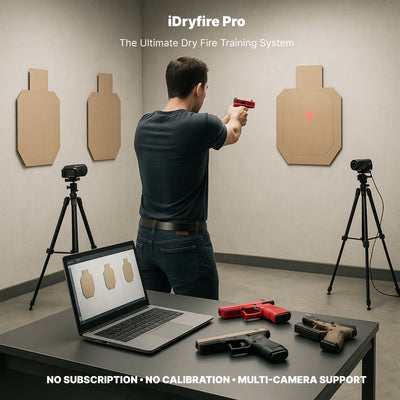
The Ultimate Dry Fire Training System
NO SUBSCRIPTION • NO CALIBRATION • MULTI-CAMERA SUPPORT
Turn any space into a smart, customizable laser dry fire training system with iDryfire® Pro. Our plug-and-play setup, rugged metal enclosure, and precision hit detection deliver realistic home shooting practice with real-time feedback. Perfect for competitive shooters, instructors, and anyone looking to improve accuracy, speed, and consistency — all without ammo costs or range trips.
🖥️ Rugged, Professional Hardware
-
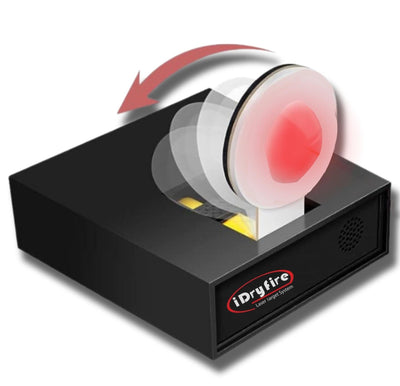
Metal Enclosure (Pro Models): Built tough for consistent, long-term use
-
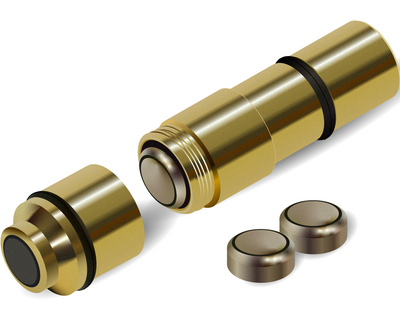
Red / Green / IR Laser Detection: Works with all popular laser cartridges and SIRT training pistols
-
Dual-Camera Mode: Expand your training area, add lateral angles, and build dynamic movement drills
-
Quick Plug-and-Play: No calibration needed — connect, launch, and start shooting in minutes
💻 Powerful, Interactive Software
-
Windows & macOS Compatible – Works on most modern systems
-
Real-Time Hit Feedback – Shot placement, split times, stage times
-
Shot-Trace Playback – Visualize muzzle movement (with SIRT or compatible devices)
-
Scenario & Drill Builder – Create custom drills or use included templates
-
Dynamic Target Support – IPSC, IDPA, silhouette, hostage, or custom targets
⚙️ App Setup & Precision Tuning
iDryfire® Pro isn’t just plug-and-play — it’s a configurable platform that lets you adjust what you train, how you score it, and what you measure.
🖥️ Camera & Target Setup
-
Positioning: Use the live preview to ensure the entire shooting area is in frame.
-
Dual-Camera Mode: Configure front + side cameras for multi-angle or hallway drills.
-
Custom Target Zones: Define A-zones, head boxes, or create your own layouts for match prep or defensive scenarios.
🎛 Fine-Tune Detection
-
Sensitivity Control: Adjust for different laser strengths (bright red, green, or low-output IR).
-
Lighting Calibration: Built-in guide helps eliminate glare or dead spots for consistent detection.
-
Feedback Options: Choose sound-only, visual-only, or combined feedback depending on drill focus.
📊 What You Can Track
Every shot is recorded and displayed in real time:
-
Precise Hit Placement on-screen
-
Trigger Press Trace (before/after break with compatible devices)
-
Split & Reaction Times — draw-to-first-shot, follow-up splits
-
Transition Paths — identify overtravel or “fishing” between targets
-
Session History — save and compare performance over multiple sessions
🧠 Training Workflow
-
Select Your Drill Profile – Accuracy, Speed, or Scenario Mode
-
Run Your Session – Live data after every string
-
Review & Diagnose – Identify grip collapse, sight dip, slow transitions
-
Adjust & Repeat – Tighten par times, shrink hit zones, or change scenarios to keep progressing
This section ensures shooters understand how to customize the experience and use the data to improve faster.
📑 Drills for Every Skill Level
Whether you’re practicing low-ready fundamentals, holster draws, reloads, or match-level transitions, iDryfire® Pro gives you the tools to improve every session.
🏋️ Foundational Drills
Low-Ready Accuracy Drill
-
1 target at 3–5 yards
-
Present from low ready, acquire sights, press trigger
-
Goal: 9/10 clean hits
Draw from the Holster
-
Start with hands in a natural position, draw and fire
-
Build a smooth, consistent draw stroke before adding speed
Strong-Hand / Support-Hand Only
-
Fire 5–10 shots using only one hand
-
Focus on sight stability and trigger control
🔄 Dynamic & Advanced Drills
Reload + Re-Engage
-
Perform a speed reload, re-acquire sight picture, fire again
-
Keep gun indexed at eye level for efficiency
Multi-Target Transitions
-
Engage 2–3 targets, watch trace playback for wasted motion
-
Work toward straight, smooth transition arcs
Bill Drill (Cadence Control)
-
Fire 6 shots rapidly at one target
-
Focus on even splits and maintaining sight picture
💡 Pro Tip: Use iDryfire’s dual-camera setup to add movement — step, pivot, or engage targets from different angles to simulate match stages or defensive scenarios.
🎯 Key Features
-
Advanced Laser Tracking – Pinpoint shot location, trace muzzle movement
-
Realistic Simulation – Works with recoil & non-recoil trainers
-
Customizable Targets – IPSC, IDPA, silhouettes, or projector targets
-
Dual-Camera Support – Train for lateral transitions and complex stages
-
No Subscription, No Calibration – Own it for life, train without recurring fees
🏆 Benefits of iDryfire® Pro
-
Save Money: No ammo, range fees, or travel
-
Train Anytime: Home or office practice, day or night
-
Build Consistency: Reinforce proper grip, draw, and trigger control
-
See Real Progress: Measurable, repeatable data for each session
-
Adaptable Growth: From new shooter to USPSA/IPSC competitor
⚡ Easy Setup
-
Install iDryfire® Pro software
-
Connect camera(s) & verify detection area
-
Attach laser cartridge or use training pistol
-
Select & print targets (Download Free Targets)
-
Start session & review results after each drill
📦 Available System Options
Camera + Software Packages:
✅ iDryfire® Single Camera – RED/GREEN
✅ iDryfire® PRO – RED/GREEN
✅ iDryfire® Single Camera – IR/RED/GREEN (Metal Enclosure)
✅ iDryfire® PRO – IR/RED/GREEN (Metal Enclosure)
Camera-Only & Software-Only Packages Available – Choose exactly what you need.
🗣 Testimonials
“iDryfire Pro completely changed my training routine. I’ve saved so much on ammo, and my accuracy has improved significantly!”
— John D., Competitive Shooter
“Being able to practice at home anytime is a game-changer. The software is intuitive and the feedback is immediate.”
— Emily S., New Shooter
🎥 Learn From the Best
🛡 Warranty & Support
-
Lifetime hardware warranty
-
Lost license key recovery is available online
Leave a comment